Key takeaways
- Wispr Flow is closed source and cloud only. Its free plan allows 2,000 words a week on desktop; Pro is $15 a month or $144 a year.
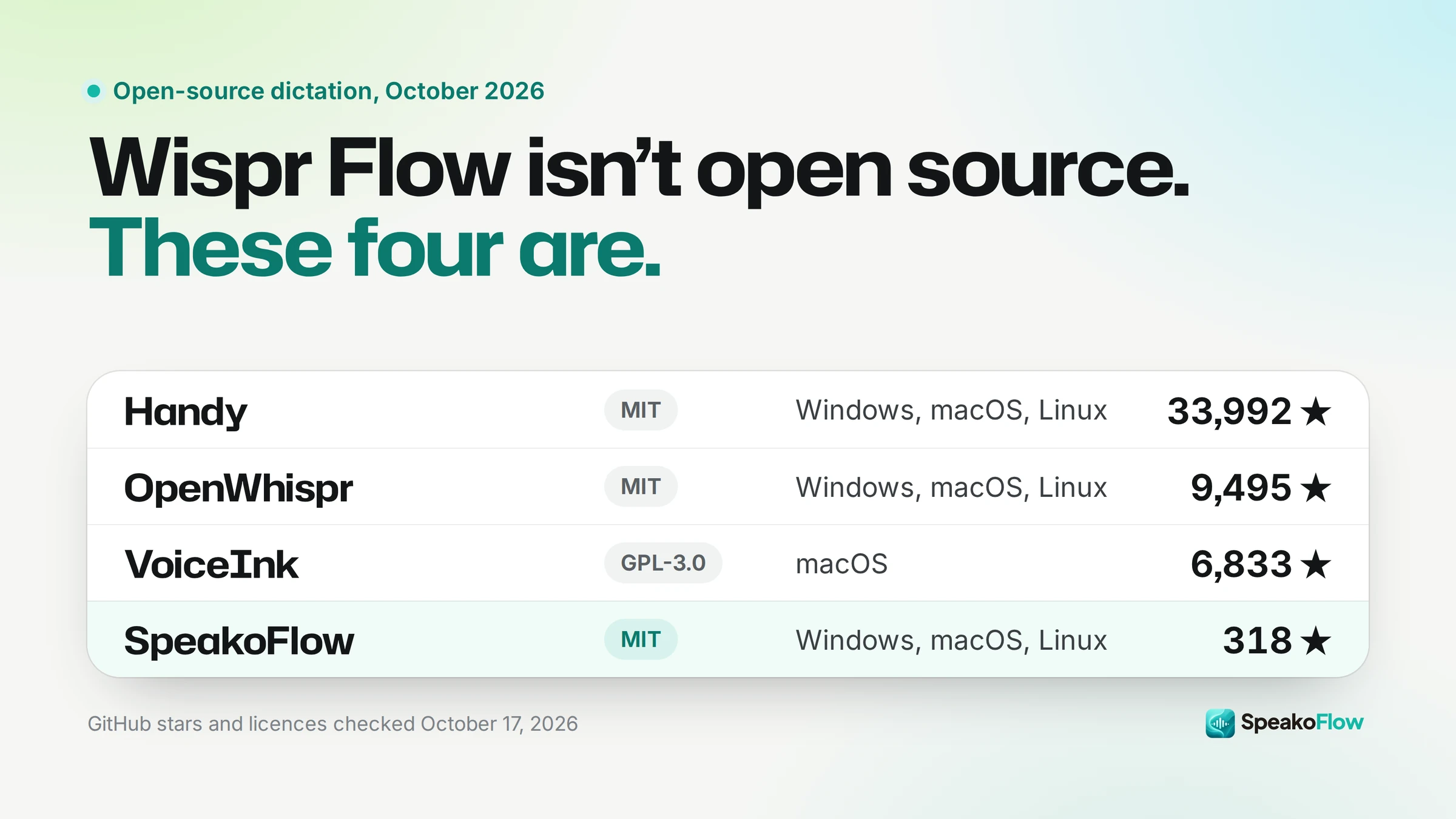
- Handy, SpeakoFlow and OpenWhispr are MIT licensed, type into any app, and run on Windows, macOS and Linux.
- Handy is by far the most established, with 33,992 GitHub stars against SpeakoFlow's 318. SpeakoFlow's dictation core comes from Handy.
- VoiceInk is open source (GPL v3) but Mac only: $25 once for the prebuilt app, or free to build.
- Over three years, Wispr Flow Pro costs $432 on annual billing. Handy and SpeakoFlow cost $0.
October 2026 update: every price and star count re-checked on 17 October, OpenWhispr added, and Handy's star count corrected to 33,992.
Disclosure: I build SpeakoFlow, so this is not a neutral review. Each entry says who it is the wrong choice for, ours included.
The best free, open-source Wispr Flow alternatives in October 2026 are Handy, SpeakoFlow, OpenWhispr and VoiceInk. Each one types into any app when you press a key and speak, and each can transcribe on your own computer, so there is no weekly word cap.
Is Wispr Flow open source?
No. Wispr Flow's code is not public, and its security FAQ says it "processes dictated audio in the cloud to turn speech into text." On the Free and Pro plans, sharing your data to improve its model is on by default, though you can turn it off.
The free plan allows 2,000 words a week on Mac and Windows and 1,000 on mobile. Pro costs $15 a month, or $144 a year.
Wispr Flow does win in places. It has iPhone and Android apps, needs no setup or model download, and runs well on old or low-powered computers because the cloud does the work. If those matter most to you, it may still be the right tool.
What counts as a real Wispr Flow alternative?
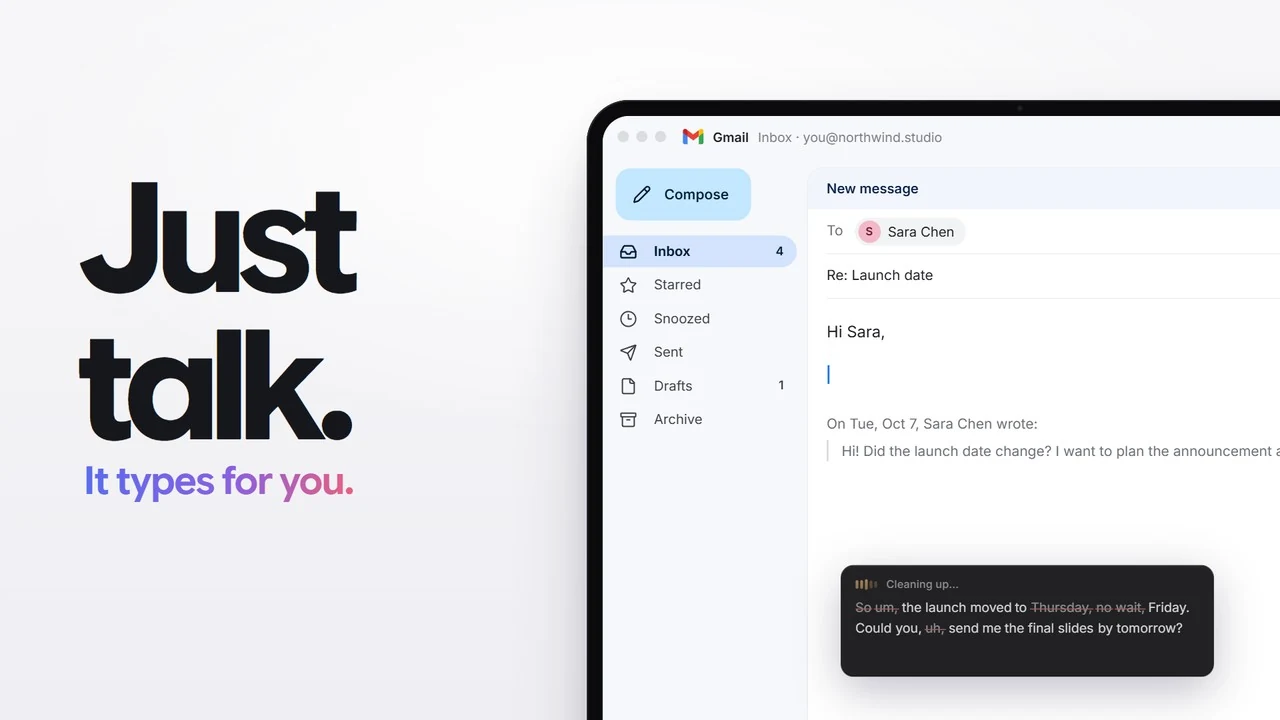
A real alternative does what Wispr Flow does: press a key in any app, speak, and the text appears at your cursor. Every app in this list does that.
That rule leaves out Buzz, even though it is free, MIT licensed and has 22,035 GitHub stars. Buzz transcribes audio files, YouTube links and live microphone audio into its own window. It does not type into other apps.
Superwhisper and MacWhisper do type into other apps and have useful free tiers, but they are closed source. They are covered after the four open-source picks.
How do the free Wispr Flow alternatives compare?
Handy, SpeakoFlow and OpenWhispr are free, open source and run on Windows, macOS and Linux. VoiceInk is open source but Mac only. On Windows, the Wispr Flow alternatives for Windows guide goes through the options there in more detail.
| App | Price | Open source | Platforms | Transcription |
|---|---|---|---|---|
| Handy | Free | Yes (MIT) | Windows, macOS, Linux | On your computer |
| SpeakoFlow | Free | Yes (MIT) | Windows, macOS, Linux | On your computer by default; cloud optional |
| OpenWhispr | Free; Pro $80/year | Yes (MIT), with paid cloud plans | Windows, macOS, Linux; iOS on paid plans | On your computer or cloud |
| VoiceInk | $25 once, or free to build | Yes (GPL v3) | macOS (Apple Silicon); iOS app | On your computer |
| Superwhisper | Free tier; Pro $8.49/month, $84.99/year or $249.99 once | No | Mac, Windows, iOS, Android | On your computer or cloud |
| MacWhisper | Free tier; Pro €64 once | No | macOS 14+, separate iPhone and iPad app | On your computer; cloud optional in Pro |
| Wispr Flow | Free 2,000 words/week; Pro $15/month or $144/year | No | Mac, Windows, iOS, Android | Cloud only |
1. Handy: who is it for?
Handy is for people who want free, offline dictation and nothing else, from the most established project in this list. It is MIT licensed, made by CJ Pais, and has 33,992 GitHub stars.
It runs on Windows (including ARM64), macOS and Linux, and is also on winget and Homebrew. You pick a local model (Whisper Small, Medium, Turbo or Large, or Parakeet V3) and it works completely offline. Its latest release, v0.9.8, came out on 3 October 2026.
SpeakoFlow's dictation core comes from Handy, used under the MIT license. If you only want dictation, Handy is the simpler and safer choice.
Best for: plain, private dictation from a large, active project. Wrong choice if: you want an assistant, meeting notes or AI cleanup in the same app, or you need dictation on a phone.
2. SpeakoFlow: who is it for?
SpeakoFlow is for people who want Handy-style local dictation plus a voice assistant in one free app. It is MIT licensed and runs on Windows, macOS and Linux (x64 and ARM64). I build it.
SpeakoFlow 2.0 shipped on 5 October 2026 and added:
- Voice conversations: talk back and forth and hear the answers out loud.
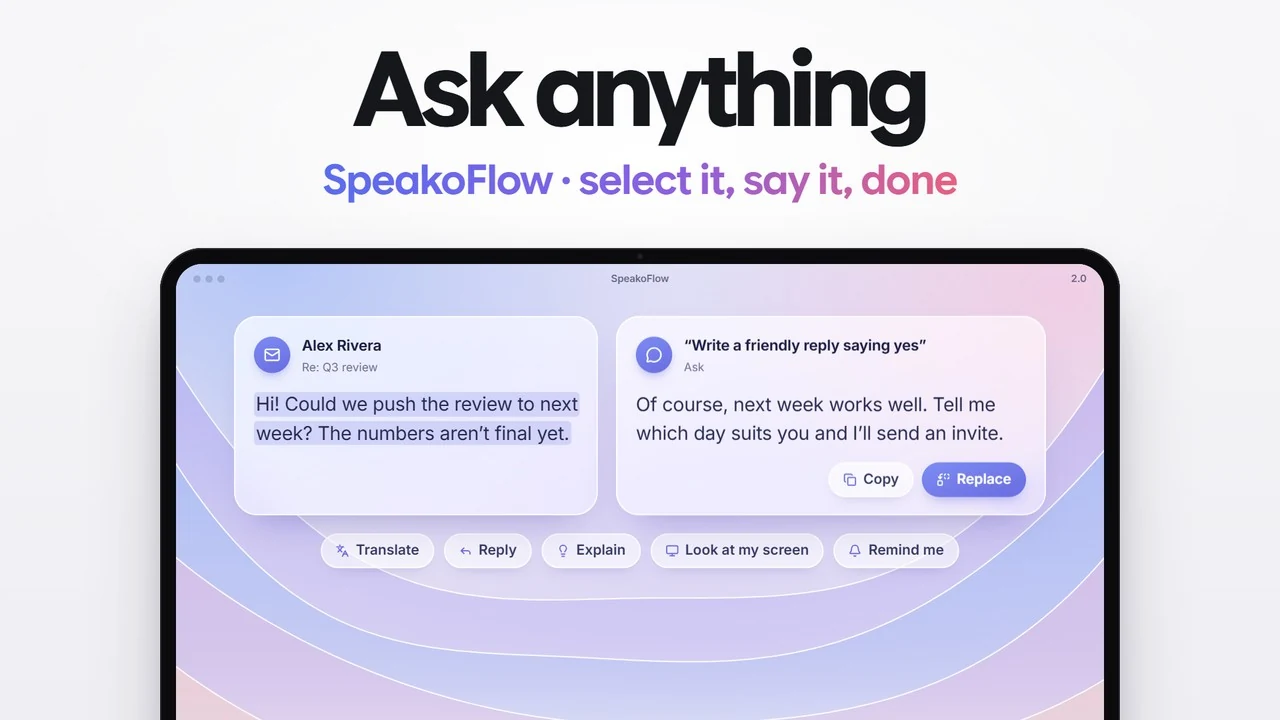
- Ask on selected text: select text in any app, say what you want ("translate this", "reply to this"), then copy, insert or replace it.
- Meetings: records your mic and computer audio and writes notes. No bot joins the call.
- Optional cloud speech services such as ElevenLabs, Deepgram, OpenAI and Groq, if you prefer them to a local model.
Speech is transcribed on your computer unless you choose one of those cloud services. There is no account and no telemetry. The latest release is v2.1.0, from 17 October 2026.
Pros
- Free, MIT licensed, no account and no word cap
- Windows, macOS and Linux, including ARM64 Linux
- Dictation, an assistant and meeting notes in one app
- Local speech models by default (Parakeet, Nemotron, Whisper and more)
Cons
- A young project: 318 GitHub stars against Handy's 33,992
- Builds are not code signed, so Windows and macOS warn on first install
- The Linux build needs glibc 2.39 or newer (Ubuntu 24.04 and later)
- Recording the other side of a meeting on macOS needs a virtual audio device such as BlackHole
- No phone app, and more settings to learn than Handy
Best for: one free app for dictation, quick questions and meeting notes on any desktop. Wrong choice if: you want the most established project (that is Handy) or a phone app.
3. OpenWhispr: who is it for?
OpenWhispr is for people who want dictation, meeting transcription and notes in one app, and may want to pay for a hosted cloud later. It is MIT licensed, has 9,495 GitHub stars, and runs on Windows, macOS and Linux.
It is open core. The free plan includes unlimited local models (Parakeet or Whisper) and cloud models with your own API key, plus 2,000 words a week of OpenWhispr's own cloud and 5 hours a month of meeting recording. Pro is $80 per user per year and Business is $160.
Best for: a dictation and meetings suite with a paid cloud option if you ever want one. Wrong choice if: you want a small app that only dictates; Handy is simpler.
4. VoiceInk: who is it for?
VoiceInk is for Mac users who want a focused, open-source dictation app and are happy to pay once. It is GPL v3, has 6,833 GitHub stars, and transcribes on your Mac.
The prebuilt app costs $25 once for one Mac ($39 for two, $49 for three), with a free trial and a 14-day refund. Building it yourself from source is free.
It needs an Apple Silicon Mac. The site says macOS 14.4 or later while the README says 15.0, so check your version before you buy. There is also an iOS app, but no Windows or Linux version.
What about Superwhisper and MacWhisper?
Both are polished apps with free tiers, but both are closed source, so you cannot check how they handle your audio.
Superwhisper now runs on Mac, Windows, iOS and Android. After a 3,000-word Pro trial, the free tier gives unlimited use of Whisper models. Pro costs $8.49 a month, $84.99 a year or $249.99 once, and adds cloud models and larger local ones. Its Meetings feature is Mac only.
MacWhisper is built for Mac, with a separate iPhone and iPad app. It transcribes files, podcasts and meetings, and also has system-wide dictation. The free version stays free; Pro is €64 once on the official site.
Pick one of these if you want a vendor-supported app or a phone app and do not need to read the source.
What does each option cost over three years?
Over three years, Wispr Flow Pro costs $432 on annual billing, while Handy and SpeakoFlow cost nothing. The chart counts license and subscription fees for one person.
Three-year cost, one user
License and subscription fees only. Prices checked 17 October 2026.
annual $432
yearly $254.97
lifetime $249.99
one Mac $25
or Handy $0
The arithmetic: Wispr Flow $144 × 3 = $432 (or $15 × 36 = $540 if you pay monthly). Superwhisper $84.99 × 3 = $254.97, against $249.99 once for lifetime. VoiceInk is $25 once, or $0 if you build it. OpenWhispr's free plan is $0, and Pro would be $80 × 3 = $240. Sources: Wispr Flow, Superwhisper, VoiceInk, OpenWhispr.
The free apps cost setup time instead. You download a speech model on first run, and support comes through GitHub issues rather than a help desk.
Which Wispr Flow alternative should you choose?
Pick by the one thing that matters most to you.
- The most established open-source project
- Handy. 33,992 stars, MIT, dictation only.
- Dictation plus an assistant and meeting notes, all free
- SpeakoFlow. Same dictation core as Handy, with voice conversations, Ask on selected text and meeting notes with no bot.
- Dictation and meetings, with a paid cloud if you want it
- OpenWhispr. Free with local models; Pro is $80 a year.
- A Mac, and you are happy to pay once
- VoiceInk. $25 once, or free from source. Apple Silicon only.
- Windows
- Handy, SpeakoFlow or OpenWhispr, or Superwhisper if closed source is fine. See the Windows comparison.
- Linux
- Handy, SpeakoFlow or OpenWhispr. Wispr Flow, Superwhisper, VoiceInk and MacWhisper do not list Linux. See the Linux dictation guide.
- Dictation on your phone
- Wispr Flow or Superwhisper (iOS and Android). VoiceInk has an iOS app, and OpenWhispr adds iOS on paid plans.
- An old or low-powered computer
- Wispr Flow. Cloud transcription does not depend on your hardware.
Frequently asked questions
Is Wispr Flow open source?
No. Its source code is not public, and it transcribes your speech on its own servers. Free, open-source apps that do the same job include Handy, SpeakoFlow and OpenWhispr (all MIT licensed) and VoiceInk (GPL v3, Mac only).
Is there a completely free Wispr Flow alternative?
Yes. Handy and SpeakoFlow are free with no paid tier and no word cap, on Windows, macOS and Linux. OpenWhispr's free plan also has no limit when you use local models; only its own cloud is capped and paid.
Do free local dictation apps need a GPU?
Not necessarily. SpeakoFlow's Intel Mac build, for example, runs on the CPU alone. Larger models get slow on modest hardware, so pick a smaller one. On an old or low-powered computer, a cloud tool like Wispr Flow has a real advantage, because the server does the work.
Do free dictation apps keep my voice private?
With a local model, yes: your audio is transcribed on your computer. Handy and VoiceInk transcribe locally. SpeakoFlow and OpenWhispr are local by default but let you choose a cloud speech service, and then your audio goes to that service. Wispr Flow always transcribes in the cloud.
What if an open-source dictation app stops being maintained?
The version you installed keeps working. The risk is a future operating system update breaking it with nobody to fix it, so look at recent releases: Handy's latest came out on 3 October 2026 and SpeakoFlow's on 11 October 2026. Because these apps are MIT or GPL licensed, anyone can fork a project that goes quiet.
Will I lose anything by switching from Wispr Flow?
Not your writing. Dictation apps type into other apps, so there is nothing to export. You will set up your shortcut, cleanup style and custom words again, and you can keep both installed on different shortcuts while you decide.
Free, open source, and yours to inspect.
Dictation in any app, a voice assistant and meeting notes. Speech stays on your computer unless you pick a cloud service.
Windows, macOS and Linux. MIT licensed. No account, no telemetry.