Key takeaways
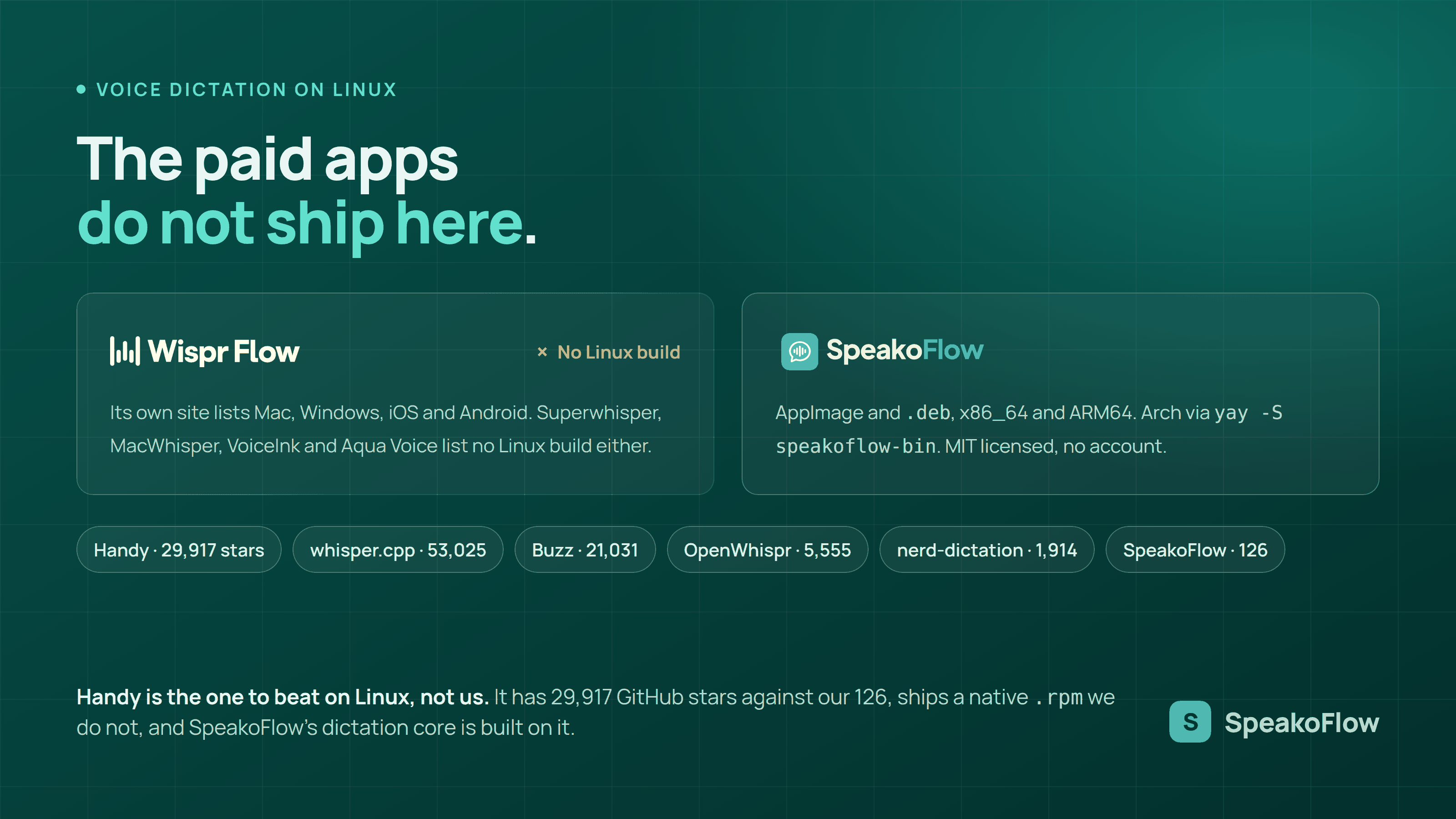
- Five of the best known dictation apps have no Linux build at all. Wispr Flow, Superwhisper, MacWhisper, VoiceInk and Aqua Voice all list only Apple and Microsoft platforms on their own sites, checked 19 August 2026.
- Handy is the community leader with 29,917 GitHub stars and an MIT licence, and it ships a native
.rpmalongside.deband AppImage builds. SpeakoFlow is built on Handy's dictation core. - whisper.cpp is the most starred project here at 53,025 stars, but it is a library and a command line tool, not a press-a-key dictation app.
- nerd-dictation is a single Python file at 1,914 stars and GPL-3.0, with no tagged release and its last commit on 10 October 2025. It is the lightest option and the least maintained.
- NVIDIA Parakeet TDT 0.6B v3, the default model in SpeakoFlow, records 6.34% average word error rate on the Open ASR Leaderboard and matches Whisper Large v3 on multilingual accuracy at roughly 15 times the throughput.
Disclosure: SpeakoFlow is our product, so read this as an informed comparison rather than a neutral review. Handy beats us on almost every community measure, with 29,917 stars against our 126, and SpeakoFlow's dictation engine is built on the open-source Handy core by CJ Pais. nerd-dictation is far lighter than anything we ship. And the cloud tools that skip Linux entirely are genuinely better on old or low-powered hardware, because they never load a model onto your machine at all.
Handy leads that group on community with 29,917 GitHub stars, SpeakoFlow offers the widest choice of speech models, and OpenWhispr sits between the two. Three more projects come up constantly in Linux dictation threads and belong in a different category: Buzz, whisper.cpp and nerd-dictation.
That absence is the whole story of this search result. Look for dictation software on Linux and you find forum threads, half-finished scripts, and pages about Mac apps. The reason is commercial rather than technical.
Why can't you just buy Wispr Flow or Superwhisper for Linux?
Because neither company builds a Linux version, and neither hides it. I checked all five of the popular paid or Mac-only apps against their own live pages on 19 August 2026. Not one of them offers a Linux download, a Linux beta, or a Linux waiting list. Searching their names alongside the word Linux is a dead end by design.
Here is what each vendor states on its own site. Wispr Flow says its dictation product runs on "Mac, Windows, iOS, and Android", and prices Pro at $15 per user per month billed monthly or $12 per user per month billed annually, with a free tier capped at 2,000 words per week on desktop. Superwhisper offers macOS 13.3 or later, Windows 10 or later on x64 and ARM64, and iOS 18 or later. MacWhisper is Mac only and sells a one-time Pro licence at €64. VoiceInk states plainly that it "works only on Apple Silicon Macs" and requires macOS 14.4 or later, priced from $29 lifetime for one Mac. Aqua Voice offers a Mac and an iOS download, with Pro at $8 per month.
Wispr Flow, Superwhisper, MacWhisper, VoiceInk and Aqua Voice have no Linux build. Checked against each vendor's own live download or pricing page on 19 August 2026. Superwhisper does ship Windows now, so it is no longer Mac only, but Linux is absent from all five.
Which Linux dictation tools actually work in 2026?
Six projects are worth your time, and they split into two groups. Handy, SpeakoFlow and OpenWhispr are desktop apps with a global shortcut that types into whatever window has focus. Buzz, whisper.cpp and nerd-dictation are something else: a transcription workbench, a library, and a scriptable one-file utility. Confusing the two groups is the most common mistake in Linux dictation advice.
Every figure below came from the project's own repository through the GitHub API on 19 August 2026.
- Handy. MIT, 29,917 stars, release v0.9.5 published 8 August 2026. Windows, macOS on both Intel and Apple Silicon, and x64 Linux. Ships
.deb, AppImage and.rpmfor x86_64 and aarch64, which is more Linux packaging than anyone else here. Default shortcut on Linux isCtrl+Shift+D. Runs Whisper Small through Large, or Parakeet V3 on CPU, which Handy's own README measures at "~5x real-time speed on mid-range hardware (tested on i5)". - SpeakoFlow. MIT, 126 stars, release v1.3.0 published 19 August 2026. Windows, macOS, Linux. AppImage and
.debfor x86_64 and ARM64, plus an AUR package. Built on Handy's dictation core and adds a wider model list, on-device translation, and an assistant panel. - OpenWhispr. MIT, 5,555 stars, release v1.8.3 published 13 August 2026. Genuinely cross-platform, with
.deb,.rpm, AppImage and a tarball in the same release. Local Parakeet or Whisper, or cloud models with your own key. - Buzz. MIT, 21,031 stars, release v1.4.4 published 14 March 2026. Available on Linux as a Flatpak, a Snap, or
pip install buzz-captions. It does live microphone transcription, but into its own window. Its feature list has no global shortcut that types into another app, so it is a transcription tool rather than a dictation layer. - whisper.cpp. MIT, 53,025 stars, release v1.9.2 published 4 August 2026. The most starred project in this article by a wide margin, and the engine several of the others are built on. It is a C and C++ port of Whisper with a command line front end, so it is what you reach for when you are building something, not when you want to dictate an email.
- nerd-dictation. GPL-3.0, 1,914 stars, no tagged release, last commit 10 October 2025. Describes itself as "Offline Speech to Text for Desktop Linux" and is a single Python script needing Python 3.6 or newer, the VOSK API, and an input simulation tool. Its own README notes that "Text from VOSK is all lower-case", and its roadmap still lists Windows and macOS as a maybe.
"Accessibility tooling belongs in everyone's hands, not behind a paywall." Handy's README, quoting handy.computer, on why the project is free.
How accurate is offline dictation on Linux?
Accurate enough that the model is no longer the weak link. The models these tools run are published, benchmarked by third parties, and identical whichever operating system loads them. NVIDIA Parakeet TDT 0.6B v3, the default in SpeakoFlow and an option in Handy and OpenWhispr, records 6.34% average word error rate and 1.93% on LibriSpeech test-clean.
Those figures come from the Open ASR Leaderboard and NVIDIA's own model card, not from any testing I ran. Because the model runs locally, its published accuracy is the accuracy you get, before any optional cleanup step.
| Model | Average WER | LibriSpeech test-clean |
|---|---|---|
| NVIDIA Canary Qwen 2.5B | 5.63% | 1.60% |
| NVIDIA Parakeet TDT 0.6B v3 | 6.34% | 1.93% |
| OpenAI Whisper Large v3 | 7.4% | Not listed |
Speed is where the choice of model shows up in daily use. The ASR Leaderboard paper (arXiv:2510.06961) records Parakeet TDT 0.6B v3 and Whisper Large v3 at the same 4.81% average WER on multilingual short-form audio, but at 1720 and 111 RTFx respectively. RTFx is seconds of audio processed per second of compute, so that is the same measured accuracy at roughly 15 times the throughput.
Those RTFx numbers come from datacenter GPUs with batching, so your laptop is far slower in absolute terms and nobody should quote them as desktop performance. The ratio between models still holds. At even one hundredth of 1720 RTFx, a 15-second sentence finishes well under a second.
On Linux, SpeakoFlow accelerates transcription with OpenBLAS and Vulkan, falling back to CPU when no usable GPU is present. Handy's README recommends an Intel, AMD or NVIDIA GPU for its Whisper models on Ubuntu 22.04 or 24.04, and notes that Parakeet V3 runs CPU-only from Intel Skylake or equivalent AMD chips upward.
How do you install SpeakoFlow on Ubuntu, Arch, or Fedora?
Three routes, depending on your package manager. Arch users install from the AUR. Debian and Ubuntu users install the .deb, which registers a desktop entry and an icon. Everyone else, Fedora and openSUSE included, runs the AppImage. Downloads live on the releases page, and the current release is v1.3.0.
- Arch, Manjaro, EndeavourOS. Install
speakoflow-binfrom the AUR withyay -S speakoflow-binorparu -S speakoflow-bin. Your AUR helper handles updates from then on. - Debian 13, Ubuntu 24.04 and newer, Mint 22 and newer, Pop!_OS, Tuxedo OS. Download
SpeakoFlow_1.3.0_amd64.deb, orSpeakoFlow_1.3.0_arm64.debon ARM, then runsudo apt install ./SpeakoFlow_1.3.0_amd64.deb. The.debis built on Ubuntu 24.04 and needs that era of glibc, so on Ubuntu 22.04 or Debian 12 use the AppImage instead. - Fedora, openSUSE, anything else. Download
SpeakoFlow_1.3.0_amd64.AppImageorSpeakoFlow_1.3.0_aarch64.AppImage, make it executable withchmod +x, and run it. There is no.rpmyet, because the packaging does not bundle the speech engine correctly and an.rpmthat installs but cannot transcribe would be worse than none. Handy and OpenWhispr both ship real.rpmbuilds if that matters more to you than anything else in this article. - Give the AppImage a menu entry. A single-file AppImage cannot register an icon or desktop entry by itself. Gear Lever or AppImageLauncher add that if you want it.
- Pick a model, then set your shortcut. A short setup wizard offers the transcription models on first launch. The Linux default for dictation is
Ctrl+Space, and the assistant panel isCtrl+Alt+Space. Both are rebindable.
Push to talk is the default behaviour: hold the shortcut, speak, and release to have the text typed out. If holding a key while talking is awkward, switch Recording behavior to Tap in Settings, where one press starts and the next press stops. That setting applies to every recording shortcut at once.
Does Linux dictation work on Wayland or only X11?
It works on both, but Wayland is the harder case and every project handles it differently. Wayland deliberately gives an application no standard way to inject keystrokes into another window or to raise itself above other windows. Those are the two things a dictation tool needs.
Handy's README is direct about the cost: it lists "Limited support for Wayland display server" under known issues, asks you to install wtype or dotool for text input, and warns that on Ubuntu 26.04, which defaults to Wayland, wtype does not work and you need ydotool configured through systemd. nerd-dictation defaults to xdotool, which its documentation marks as "Compatible with the X server only", and offers DOTOOL, YDOTOOL or WTYPE for Wayland instead.
SpeakoFlow's constraint is its recording overlay, which has to float above everything else. Per the repository, that needs either the wlr-layer-shell protocol, used by wlroots compositors such as Sway and Hyprland and by KDE Plasma, or classic X11 keep-above stacking. A native GNOME session on Wayland supports neither, because Mutter does not implement wlr-layer-shell. So SpeakoFlow detects GNOME on Wayland and runs itself under XWayland, where keep-above works. X11 sessions and KDE or wlroots Wayland sessions already work without that. Two environment variables override the behaviour if you want to test it: SPEAKOFLOW_ALLOW_WAYLAND=1 forces native Wayland, and SPEAKOFLOW_NO_GTK_LAYER_SHELL=1 disables layer shell.
Wayland is not a blocker for Linux dictation in 2026, but it is not free either. Expect to install a helper such as wtype, dotool or ydotool for Handy and nerd-dictation. SpeakoFlow falls back to XWayland on GNOME automatically, with no packages to install.
How does SpeakoFlow compare with Handy on Linux?
They share a foundation, so the comparison is narrow. SpeakoFlow is built on the open-source Handy dictation core by CJ Pais, so the transcription path started as the same code. The differences are packaging, how many models you can pick from, what happens after the transcript exists, and how much community sits behind each project.
| SpeakoFlow | Handy | Wispr Flow | |
|---|---|---|---|
| Runs on Linux | Yes | Yes | No |
| Price | $0, MIT | $0, MIT | $15 per user per month, or $12 billed annually |
| GitHub stars | 126 | 29,917 | Closed source |
| Latest release | v1.3.0, 19 Aug 2026 | v0.9.5, 8 Aug 2026 | Not published as a tagged release |
| Linux packages | AppImage, .deb, AUR |
AppImage, .deb, .rpm |
None |
| ARM64 Linux build | Yes | x64 only per README | None |
| Speech models | Parakeet, Canary, Nemotron, Whisper S to L | Whisper S to L, Parakeet V3 | Vendor's own, in the cloud |
| Audio leaves your machine | Never | Never | Cloud transcription |
| GNOME Wayland handling | Automatic XWayland fallback | Install wtype, dotool or ydotool |
Not applicable |
Where SpeakoFlow wins
- Four model families rather than two, including Canary for translation and Nemotron for streaming.
- ARM64 Linux builds for both the AppImage and the
.deb. - GNOME Wayland is handled automatically, with no helper package to install.
- Translation, optional AI cleanup, and an assistant panel on top of plain dictation.
Where Handy wins
- 29,917 stars against 126. More forks, more issues answered, more people who have hit your bug already.
- A native
.rpm, so Fedora users get real package management instead of an AppImage. - Installable through Homebrew cask and winget, though not by the Handy developers themselves.
- Deliberately smaller in scope. Its README says it is trying to be the most forkable tool, not the most capable one, and that is a real advantage if you want to read all of it.
- You are on Fedora and want proper packaging
- Handy or OpenWhispr. Both ship a real
.rpm. SpeakoFlow does not yet. - You want the largest community behind your tool
- Handy. At 29,917 stars it is the category leader by a wide margin.
- You dictate in more than one language
- SpeakoFlow. Parakeet covers 25 European languages, Whisper Medium and Large reach close to 100, and Canary translates into English on device.
- You want the smallest possible thing you can read end to end
- nerd-dictation. One Python file, VOSK, and your own config script. Accept the lower-case output and the October 2025 last commit.
- You are transcribing recordings, not dictating
- Buzz. Batch files, subtitles and speaker output, installed from Flathub or Snap.
- Your machine is very old or has almost no RAM
- A cloud tool on another OS. Nothing here will feel good, because every option loads a model locally.
Frequently asked questions
What is the best free dictation software for Linux in 2026?
For pressing a key and having text appear in whatever app you are already in, the realistic choices are Handy, SpeakoFlow and OpenWhispr. All three are free, all three are MIT licensed, and all three ship Linux packages. Handy has by far the largest community at 29,917 GitHub stars. SpeakoFlow adds a wider model choice and an assistant panel on top of Handy's dictation core.
Does Wispr Flow work on Linux?
No. Wispr Flow's own site listed Mac, Windows, iPhone and Android when I checked it on 19 August 2026, and its pricing page repeats the same four platforms. There is no Linux download and no Linux beta advertised anywhere on the site. The same is true of Superwhisper, MacWhisper, VoiceInk and Aqua Voice.
Can I use voice dictation on Wayland?
Yes, but the details matter. Wayland gives applications no standard way to inject keystrokes into another window, so tools solve it differently. Handy's README asks you to install wtype or dotool and notes that wtype does not work on Ubuntu 26.04. nerd-dictation defaults to xdotool, which is X11 only, and offers dotool, ydotool or wtype instead. SpeakoFlow runs under XWayland on GNOME sessions automatically.
Which Linux distributions can run SpeakoFlow?
Arch and its derivatives install speakoflow-bin from the AUR. Debian, Ubuntu 24.04 and newer, Mint 22 and newer, Pop!_OS and Tuxedo OS install the .deb. Everything else, including Fedora and openSUSE, runs the AppImage. Both the AppImage and the .deb are built for x86_64 and ARM64. There is no .rpm yet, because the packaging does not bundle the speech engine correctly.
Does Linux dictation work without an internet connection?
Yes, for every tool in this roundup. Handy, SpeakoFlow, OpenWhispr, Buzz, whisper.cpp and nerd-dictation all run the speech model on your own machine, so once the model file is downloaded no network is needed. That is also the reason none of them work well on a very old or very low-powered machine, where a cloud service would.
Is Handy or SpeakoFlow the better choice on Linux?
Pick Handy if you want the largest community, the most forks to learn from, a native .rpm for Fedora, or the simplest possible tool. Pick SpeakoFlow if you want a wider choice of speech models, translation, an assistant panel, and automatic XWayland handling on GNOME. SpeakoFlow is built on Handy's dictation core, so the transcription foundation is the same code.
Dictate on the distro you already run
AppImage, .deb, or the AUR. Pick a model, hold Ctrl+Space, and talk. Your voice is transcribed on your own machine and never uploaded.
Windows, macOS, and Linux. MIT licensed. No account, no telemetry.