Key takeaways
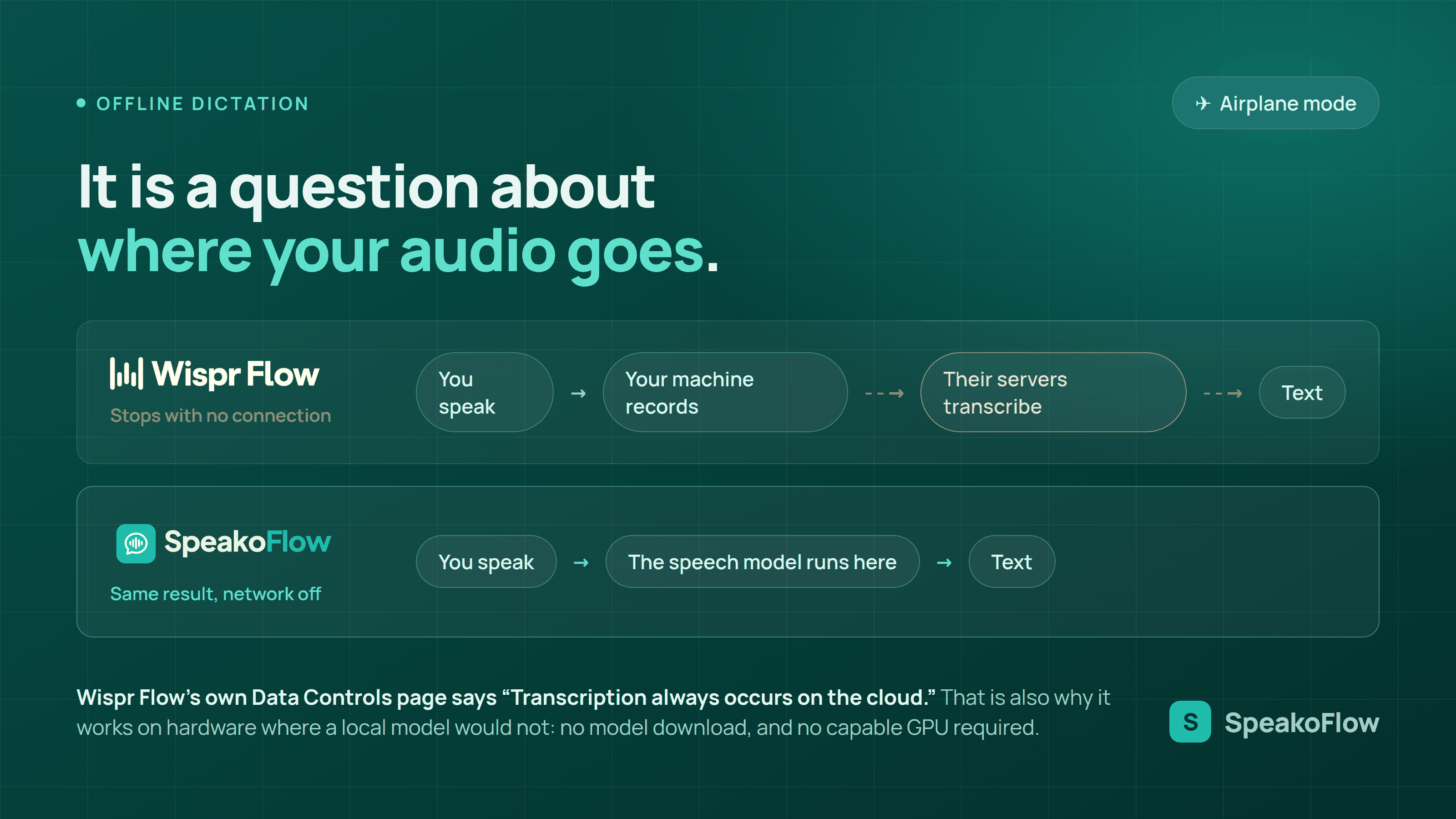
- Wispr Flow does not transcribe offline. Its Data Controls page, last updated August 18, 2026, states: “Transcription always occurs on the cloud.”
- With no connection, desktop Flow stops you at the door. Its help center says that on Mac and Windows, “If Flow detects you’re offline, it shows a No internet connection notification.”
- No local mode exists or has been announced as of August 19, 2026. Wispr’s security FAQ states it is multi-tenant software hosted with a US cloud provider, with “no on-premise version.”
- Local is no longer the accuracy compromise it was. On the Open ASR Leaderboard, NVIDIA Parakeet TDT 0.6B v3 records 6.34% average WER and 1.93% on LibriSpeech test-clean, and it matches Whisper Large v3 on multilingual short-form accuracy at 4.81% average WER while running roughly 15 times faster.
- Cloud has a real advantage: no download and no hardware bar. Wispr Flow asks nothing of your machine beyond a network connection. Parakeet’s model card asks for at least 2GB of RAM just to load.
Disclosure: SpeakoFlow is our product, so read this as an informed comparison rather than a neutral review. Wispr Flow wins on hardware. It needs no model download and makes no demand on your CPU, GPU, or RAM, so it performs better on old or low-powered machines than any local model will. It also runs on iPhone and Android, which SpeakoFlow does not. Uploading audio in order to transcribe it is simply how cloud dictation works, and nothing here suggests otherwise.
No, Wispr Flow does not work offline. It records your voice on your device and sends the audio to Wispr’s servers to be transcribed, so with no connection there is nothing to send it to. Wispr says this plainly on two of its own pages, which is more than most cloud dictation vendors do.
The more useful question sits underneath it. “Offline” sounds like a convenience feature for flights, and it is partly that, but for dictation it is really a question about the audio path: does the recording of your voice have to leave the machine to become text? That single question decides what happens on a plane, what your security team can approve, and whether a vendor outage can stop you working. This post answers the yes-or-no question with Wispr’s own words, then works through what offline actually buys you.
What do Wispr Flow’s own pages say about working offline?
Wispr Flow states that transcription is always a cloud operation, in two separate places, in almost identical words. Its Data Controls page says “Transcription always occurs on the cloud. This is the best way for us to provide accurate, low latency transcription.” Its Privacy and Security page says “Transcription always happens in the cloud to provide the best speed and accuracy.”
Its Security and compliance FAQ is more specific still. Wispr Flow is described as “multi-tenant SaaS hosted entirely with a major US cloud provider” with “no on-premise version.” The same page states that “dictation content is processed server-side,” that “all customer data is processed and stored in the United States regardless of user location,” and that Wispr operates “no European or other regional processing location.” It also confirms the product “is not end-to-end encrypted in the strict cryptographic sense,” because “audio must be decrypted to produce a transcription.”
I checked wisprflow.ai, its pricing page, its help center, and its changelog on August 19, 2026, looking for any local model, on-device mode, or offline queue. There is none, and none is announced. The pages are not ambiguous about this, which I want to credit: Wispr documents the architecture accurately rather than leaving buyers to guess.
Wispr Flow has no offline mode and no on-device option. Its Data Controls page states “Transcription always occurs on the cloud,” its security FAQ states there is “no on-premise version,” and all dictation is processed on US servers regardless of where the user is. Checked against those pages on August 19, 2026.
What happens on a plane, and on a locked-down corporate network?
On a plane with no wi-fi, desktop Wispr Flow tells you before you speak. Its help center states: “Before dictating (Mac/Windows): If Flow detects you’re offline, it shows a No internet connection notification.” Lose the connection mid-sentence instead and “audio already recorded may be preserved in History,” so you retry after reconnecting.
Android behaves differently, and worse. The same article says “Flow does not block dictation when offline. If the connection is lost, the transcription may fail without notice,” leaving you to retry from History. Paid in-flight wi-fi is not a clean escape either. Wispr lists “Network timeout: Your internet dropped or was too slow” as a reason transcripts fail, and its own engineering target is a “maximum networking budget of 200ms.” A shared cabin link is not the environment that budget was drawn for.
Corporate networks are the case people underestimate. Wispr’s own troubleshooting sequence tells you to turn off your VPN, and if dictation then works, “your VPN was blocking Flow’s connection.” The next step is confirming Wispr Flow is allowed through the firewall on Mac or Windows. For a regulated team the harder blocker is jurisdictional: US-only processing, no regional option, and no on-premise deployment. That combination ends the conversation in some procurement reviews before latency is ever discussed.
“Our users expect full transcription and LLM formatting/interpretation of their speech within 700ms of when they stop speaking. Any slower, and users get impatient.”
That is Sahaj Garg of Wispr Flow, writing in Technical challenges and breakthroughs behind Flow on September 11, 2025.
That target is the whole reason Wispr Flow is cloud-only, and it is a reasonable engineering position. To hit 700ms end to end they budget under 200ms for speech recognition, under 200ms for the language model that formats the text, and 200ms for the network. Running large models on a stranger’s five-year-old laptop makes the first two numbers unpredictable. Renting datacenter GPUs makes them controllable, and the price of that control is the third number: a connection you must always have.
What is the difference between uploading audio and on-device inference?
Every dictation app records audio locally, because the microphone is attached to your computer. The split is what happens next. Cloud dictation uploads that recording to a server, which runs the speech model and sends text back. On-device dictation runs the speech model on your own processor, so the recording never crosses the network at all.
This distinction gets blurred by privacy language that sounds like it answers the question and does not. Encryption in transit means the upload is protected while it travels, and Wispr Flow uses TLS 1.2 or higher with AES-256 at rest. Zero Data Retention means the upload is not kept afterwards. Both are real protections and Wispr implements them properly, with a SOC 2 Type I audit completed in April 2026 by A-LIGN. Neither one stops the audio leaving your machine, and neither one helps when the machine has no network.
On-device inference is the only version of “private” that also happens to be the version of “works offline.” That is not a coincidence. Both properties fall out of the same architectural choice, which is why a tool built for one usually gets the other for free. It also means the guarantee is testable: turn off wi-fi, dictate, and see whether text appears.
Encryption and zero retention protect audio that has already left your computer. On-device inference means the audio never leaves. Wispr Flow does the former well, with TLS 1.2 or higher, AES-256 at rest, and a SOC 2 Type I report from April 2026. Only the latter survives a flight, an outage, or a network with no route out.
Is a local speech model actually accurate enough in 2026?
Yes, and this is the part of the picture that changed recently. Accuracy belongs to the model, not to the place it runs. The default model SpeakoFlow ships, NVIDIA Parakeet TDT 0.6B v3, records 6.34% average word error rate across the Open ASR Leaderboard suite and 1.93% on LibriSpeech test-clean, from NVIDIA’s own model card.
The per-dataset breakdown on that card shows where the difficulty actually lives: 2.75% on TED-LIUM v3, 3.59% on LibriSpeech test-other, 3.97% on SPGI Speech, 6.14% on VoxPopuli, 9.59% on GigaSpeech, and 11.31% on AMI meeting audio. Clean single-speaker dictation, which is what you do when you hold a hotkey and talk, sits at the easy end of that range. For comparison on the same leaderboard, Whisper Large v3 records 7.4% average WER and Canary Qwen 2.5B records 5.63%.
The model is 600 million parameters, covers 25 European languages with automatic language detection, and is released under CC BY 4.0. It produces punctuation and capitalisation itself, so the text that lands is already formatted rather than a wall of lowercase. None of these numbers come from testing I ran; they come from NVIDIA’s published card and the Open ASR Leaderboard, and you can check them yourself.
How fast is local transcription with no network round trip?
Fast enough that the network was never the bottleneck worth optimising. The ASR Leaderboard paper (arXiv:2510.06961) records Parakeet TDT 0.6B v3 at 4.81% average WER and 1720 RTFx on multilingual short-form, against Whisper Large v3 at the same 4.81% WER and 111 RTFx. Identical measured accuracy, roughly 15 times the throughput.
RTFx is seconds of audio processed per second of compute, so transcription time is approximately the length of the utterance divided by RTFx. At 1720 RTFx, a 15-second spoken sentence implies about 9 milliseconds of compute. That figure needs its limitation stated plainly: leaderboard throughput is measured on datacenter GPUs with batching, so a laptop is far slower in absolute terms and SpeakoFlow does not claim those numbers on consumer hardware. The ratios hold anyway, and even at one hundredth of leaderboard throughput a 15-second utterance finishes well under a second.
On long-form English the same paper puts Parakeet TDT 0.6B v3 first in its table at 10.7% WER and 1000 RTFx, ahead of Whisper Large v3 Turbo at 11.0% and Whisper Large v3 at 11.2%. The practical consequence of running locally is not that it is faster than a good cloud service on a good day. It is that your latency depends on your own hardware, which does not get slower because a vendor is having a busy afternoon.
Wispr is candid about this. Its changelog reported on July 9, 2026 that “dictation stayed up and running 99.9% of the time over the past few weeks,” and that latency was “down 30% since the start of the year.” Both are respectable numbers. They also posted three separate reliability updates in June 2026 about outages and backend instability. Ninety-nine point nine percent over thirty days still leaves about forty-three minutes when dictation does not work, and there is no local fallback to drop into. A model on your own disk has no vendor to be down.
Where does Wispr Flow genuinely win?
On hardware you cannot upgrade. Cloud transcription asks nothing of your machine except a connection, so a nine-year-old laptop with 4GB of RAM and no usable GPU gets the same model as a workstation. That is a real advantage and it is the direct consequence of the choice that costs Wispr Flow offline support.
The local path has costs that are easy to skip past. You download a model before first use. Parakeet TDT 0.6B v3 is 600 million parameters, which at the card’s F32 precision works out to roughly 2.4GB of weights, or nearer 0.6GB as an 8-bit quantised GGUF; the exact packaged download depends on which format and model you choose. NVIDIA’s card also states the model needs “at least 2GB RAM” to load, and notes that more RAM allows longer audio. On a machine already short of memory, that is not a footnote.
Wispr Flow also covers phones. Its pricing page lists dictation on Mac, Windows, iOS, and Android, with the free tier capped at 2,000 words per week on desktop and 1,000 on iPhone, and Pro at $15 per user per month or $12 billed annually. SpeakoFlow has no mobile app at all. If most of your dictation happens on a phone, this entire comparison is the wrong one to be reading.
What each approach gives up
Where on-device dictation wins
- Works with wi-fi off, on a plane, or on a network with no route out
- Audio never leaves the machine, so there is nothing to encrypt in transit
- No vendor outage, rate limit, or word cap between you and your text
- Latency tracks your own hardware rather than provider load
- No jurisdiction question, because no data crosses a border
Where Wispr Flow wins
- Nothing to download and no model file on disk
- No CPU, GPU, or RAM requirement, so old machines do fine
- Better results on low-powered hardware than any local model gives
- Runs on iPhone and Android, which SpeakoFlow does not
- A support team and a status page rather than a GitHub issue tracker
How do the two compare on offline behaviour?
| SpeakoFlow | Wispr Flow | |
|---|---|---|
| Where transcription runs | On your device | On Wispr’s servers (“Transcription always occurs on the cloud”) |
| Dictating with no connection | Works normally | Desktop shows a “No internet connection” notification |
| On-device or on-premise option | Yes, it is the default | None. “There is no on-premise version” |
| Model download before first use | Yes, once | None |
| Hardware requirement | At least 2GB RAM for the default model | A network connection |
| Where dictation data is processed | Your machine only | United States, with no regional option |
| Platforms | Windows, macOS, Linux | Mac, Windows, iOS, Android |
| Desktop recording length limit | Not published | 20 minutes on Mac and Windows |
| Exposure to a vendor outage | None, no vendor in the transcription path | Reported 99.9% dictation uptime on July 9, 2026 |
| Price | $0, MIT licensed | Free tier 2,000 words/week desktop; Pro $15/user/month, $12 billed annually |
The 20-minute desktop recording cap and the “No internet connection” notification both come from Wispr Flow’s own help center article on transcription errors, last updated four days before this post. Everything in the table above is from a Wispr page or a SpeakoFlow page, never from a third-party review.
How do you set up dictation that keeps working with the network off?
- Install once, while you still have a connection. Grab the build for your platform from GitHub Releases. Windows has an installer, macOS a disk image, and Linux an AppImage and a .deb.
- Download the speech model before you need it. Parakeet TDT 0.6B v3 is the default and covers 25 European languages with automatic detection. Pick a Whisper build instead if you dictate in a language outside that set.
- Test the guarantee rather than trusting it. Turn off wi-fi, hold the hotkey, and speak a sentence. If text lands, transcription is running on your processor. This test takes ten seconds and is the only proof that matters.
- Decide what the optional layers talk to. AI cleanup and the assistant use whichever model you point them at. Choose the built-in local model or your own Ollama or LM Studio server and the whole thing stays offline. Add a cloud provider key and those features, though not transcription, will need the network.
- You fly often, or your wi-fi is unreliable
- On-device. Cloud dictation has no degraded mode to fall back to.
- Your machine is old or has 4GB of RAM
- Wispr Flow. A local model needs at least 2GB of RAM before it does any work.
- You dictate confidential or regulated material
- On-device. Audio that never leaves the machine needs no data processing agreement.
- You mostly dictate on a phone
- Wispr Flow. SpeakoFlow is desktop only.
- Your team requires EU or in-country processing
- On-device. Wispr states all data is processed in the United States with no regional option.
- You want a vendor to call when it breaks
- Wispr Flow. Open source gives you the code, not a support contract.
Frequently asked questions
Does Wispr Flow work offline?
No. Wispr Flow's own Data Controls page states that transcription always occurs on the cloud, and its Privacy and Security page repeats that transcription always happens in the cloud. Its help center describes a No internet connection notification on Mac and Windows when Flow detects you are offline before you dictate. Checked August 19, 2026.
Does Wispr Flow have a local or on-device mode?
Not as of August 19, 2026. Nothing on wisprflow.ai, its pricing page, its help center, or its changelog describes a local model, an on-device mode, or an offline queue that transcribes without a connection. Its security FAQ states that Wispr Flow is multi-tenant software hosted with a US cloud provider and that there is no on-premise version.
Can I use Wispr Flow on a plane?
Only if the aircraft has working wi-fi and you have paid for it. With the network off, Wispr Flow's help center says desktop Flow shows a No internet connection notification before you dictate. On Android it does not block dictation, and the transcription may fail without notice, which you then retry from History once you land.
Is offline dictation less accurate than cloud dictation?
Not inherently. Accuracy is a property of the model, not of where it runs. NVIDIA Parakeet TDT 0.6B v3, which SpeakoFlow runs on your machine, records 6.34% average word error rate and 1.93% on LibriSpeech test-clean on the Open ASR Leaderboard, and matches Whisper Large v3 on multilingual short-form accuracy at 4.81% average WER.
Does SpeakoFlow need an internet connection?
Only to download the app and your chosen speech model the first time. After that, transcription runs on your own CPU or GPU and your audio is never uploaded. The optional assistant and AI cleanup use whichever model you point them at, so they stay offline with a local model and reach the network only if you supply a cloud provider key.
Does Wispr Flow keep my audio on my computer?
Its security FAQ says audio is not persisted locally, and that dictation content is processed server-side. The same page states Wispr Flow is not end-to-end encrypted in the strict cryptographic sense, because audio must be decrypted to produce a transcription. Under Zero Data Retention, decrypted audio and transcripts are never stored on Wispr's servers.
Try the airplane mode test yourself
Install SpeakoFlow, download a model, then turn off your wi-fi and dictate a sentence. That is the entire proof.
Windows, macOS, and Linux. MIT licensed. No account, no telemetry.