Which meeting note apps work without a bot?
All eight in this table do. Each one records your microphone and your computer's audio, so nothing joins the call and it works with Zoom, Meet, Teams or anything else. They differ on price, on where the audio is transcribed, and on what you can do with a meeting afterwards.
| App | Price | Platforms | Transcribes locally | Dictation too | Talk it over out loud |
|---|---|---|---|---|---|
| SpeakoFlow | Free (MIT) | Windows, macOS, Linux | Yes, by default | Yes | Yes, a voice call |
| Meetily | Free (MIT); Pro $10/user/mo | Windows, macOS (Linux from source) | Yes | No | No |
| Anarlog (was Hyprnote) | Free (MIT); Pro $14/month | Windows, macOS, Linux | Apple silicon Macs only | Pro only | No |
| OpenWhispr | Free with local models; Pro $80/user/year | Windows, macOS, Linux | Yes, or cloud | Yes | No, text only |
| Minutes | Free (MIT) | macOS, Windows (Linux command line only) | Yes | Yes | Yes, through cloud Gemini Live |
| Muesli | Free (MIT) | macOS (Apple silicon) | Yes, by default | Yes | No |
| Granola | Free with 30 days of history; Business $14/user/month | macOS, Windows, iOS, Android | No, cloud | No | No |
| Wispr Flow Notetaker | Free up to 50 recordings/week; Pro $15/month | Mac, Windows | No, cloud | Yes | No |
Disclosure: I build SpeakoFlow, so this compares our product with others. New post: every price, star count and version below was checked on October 17, 2026.
Wispr Flow now sells dictation and meeting notes together. Its Notetaker page pitches "Both in one subscription" and says it gets right the details "that other AI notetakers get wrong", setting itself directly against Granola. This post answers the obvious follow-up: is there a free, open-source version of that?
How do Granola and Wispr Flow Notetaker work?
Both record your computer's audio with no bot, then send it to the cloud to be transcribed and summarized. You chat with your notes by typing.
Granola
Granola's help center says "There is no meeting bot," and that it uses "your system audio and microphone." Its security page says it uses "transcription providers (like Deepgram and Assembly) and AI providers (like OpenAI and Anthropic)." It does not store the audio, and data is kept on AWS servers in the United States.
There are desktop apps for macOS and Windows, plus iOS, Android and Apple Watch. No Linux app is listed. The free Basic plan keeps 30 days of meeting history; Business is $14 per user per month and Enterprise is $35. You cannot bring your own AI model.
Granola Chat can search one meeting, a folder or all of them. Its mic button dictates your question into the chat box, and the answer comes back as text.
Wispr Flow Notetaker
Wispr's privacy overview says Flow "captures microphone and system audio and sends it to Wispr," and that "Notetaker uses cloud processing for meeting transcripts and summaries." Transcripts and summaries stay in Wispr's cloud, and there is no setting to opt out of that storage.
Notetaker runs on Mac and Windows only. The free plan has limited access, capped at 50 recordings a week. Pro is $15 a month or $144 a year and includes Notetaker, though Wispr says it is rolling it out to Pro users gradually. Growth with Notetaker is $33 per user per month. Model training is on by default for Free and Pro.
You ask about meetings by typing into Ask Wispr. Flow dictation keeps working while a meeting records, and the words you dictate stay out of the transcript.
Where Granola and Wispr Flow win
- Granola has iOS, Android and Apple Watch apps, for in-person meetings and, on iOS, phone calls
- Granola names speakers on Google Meet, Zoom and Teams
- Zero setup: no speech model to download, and an old laptop is fine because the cloud does the work
- More polish, and Wispr's "What did I miss?" recap during a call
What you give up
- Your meeting audio is sent to their cloud, with no local option
- A monthly price once you outgrow the free plan's limits
- No Linux app
- Answers come back as text, never out loud
For the dictation side of Wispr's bundle, the Wispr Flow pricing breakdown has every plan in detail.
What does a meeting look like in SpeakoFlow?
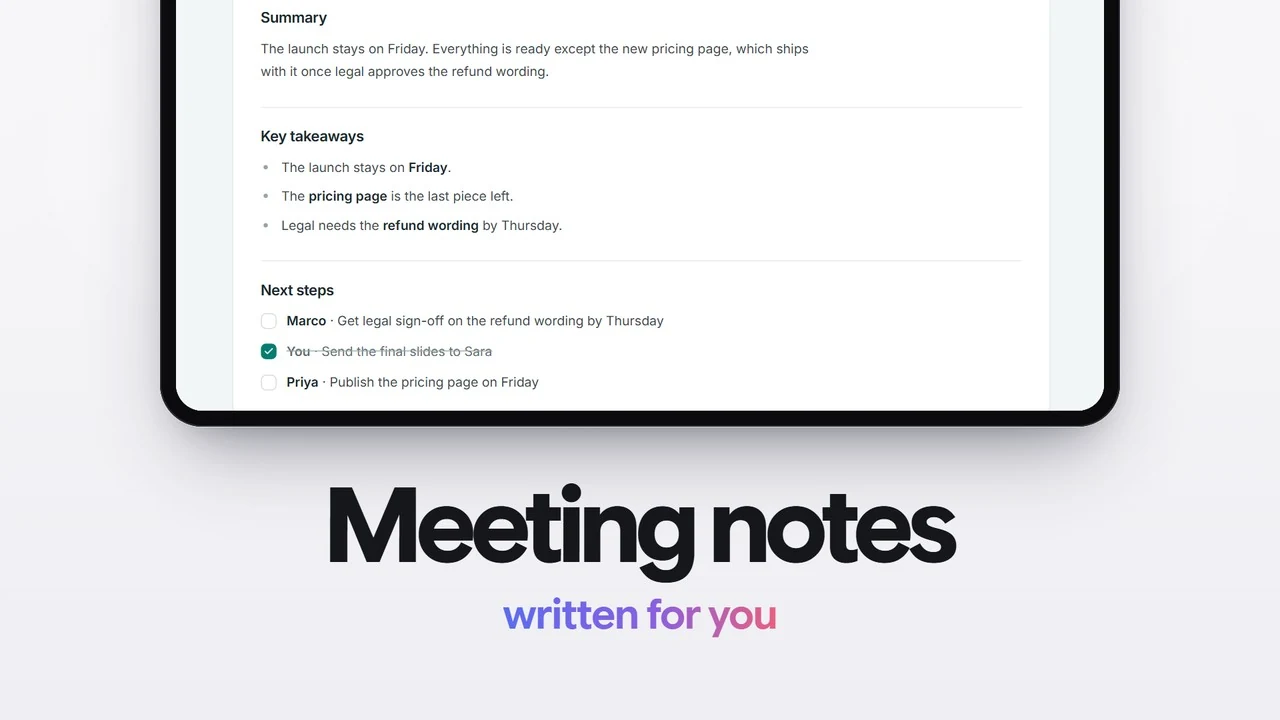
You record, get notes when the call ends, then ask about it or talk it over out loud, all in the same app you dictate with. SpeakoFlow is free, MIT licensed and runs on Windows, macOS and Linux. Here is what SpeakoFlow 2.1 does with a meeting.
- Record. Start a recording, or on Windows say yes when SpeakoFlow notices a call and offers to record it. It captures your mic and your computer's audio as two streams, so no bot joins and any meeting app works. The meeting is transcribed with whichever speech model you picked (Whisper covers 99 languages), on your computer unless you chose a cloud speech service. Tell the people on the call that you are recording.
- Get notes in the meeting's language. When the call ends, SpeakoFlow writes notes from a template: General, Standup, One-on-one, Interview or Action items. Other voices are labelled Speaker 1, Speaker 2. From version 2.1, notes are written in the meeting's own language or one you pick, you can switch notes off, and the transcript has a Copy button.
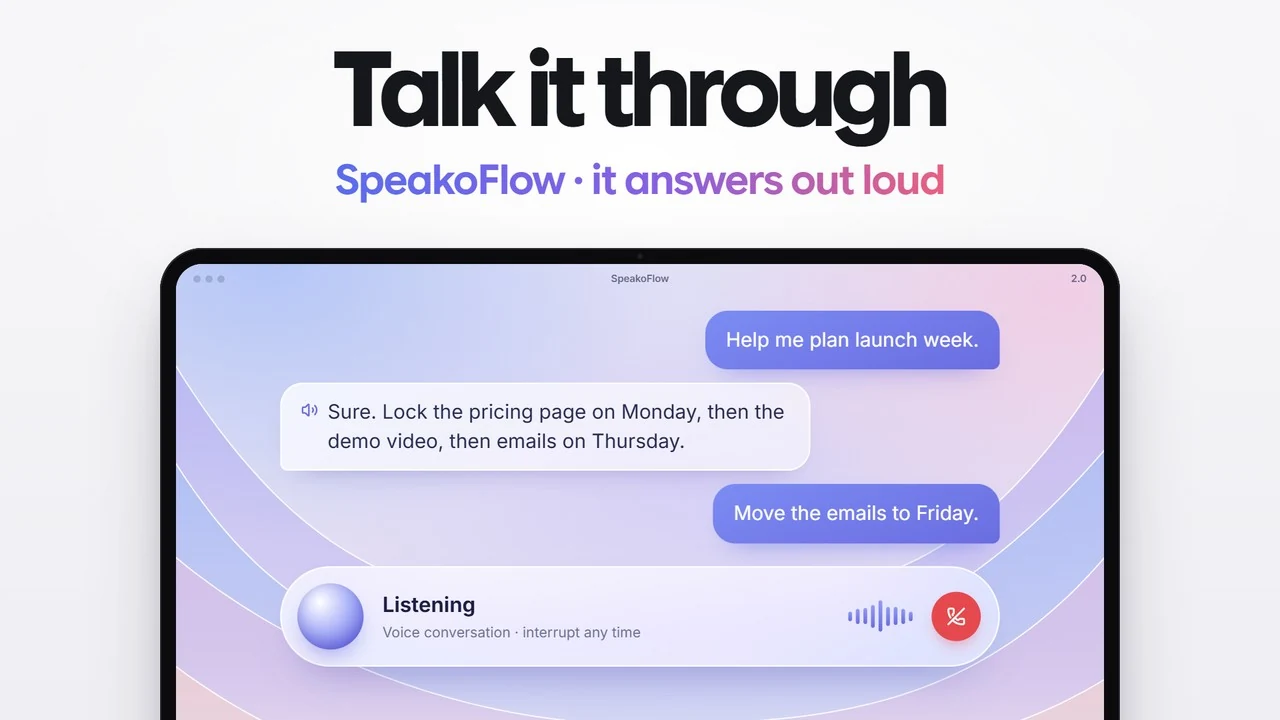
- Ask, or talk it over out loud. Type a question about the meeting, or choose Discuss this meeting to open a voice call. The assistant answers out loud, you can interrupt it, and it uses your usual assistant and persona. For a long meeting it searches and reads the transcript itself.
- Set a reminder during the call. The assistant's reminder tools are always available, so you can say "remind me on Friday to send the draft" in the middle of the discussion. Reminders survive a restart.
- Let memory learn about you, if you want it. Memory is off by default. When on, it learns lasting things about you after conversations, stays on your computer and can be edited. It does not store your meetings.
- Dictate the follow-up. The same app types into any app: hold the dictation keys (Left Ctrl + Left Win on Windows, Fn on a Mac, Ctrl + Space on Linux), speak, and the email or message lands at your cursor.
Where the AI runs is your choice. The assistant that writes notes and answers questions can use a built-in model that works offline, Ollama or LM Studio, or a cloud provider with your own key. Spoken replies can use local voices (Kokoro, Kitten, Pocket TTS, Supertonic) or cloud ones. With local models for all three, a meeting never leaves your computer. If you pick a cloud assistant, the README lists the meeting transcript among what is sent to it.
Of the eight apps in the table, SpeakoFlow and Minutes are the only two that answer questions about a meeting out loud. SpeakoFlow's voice call can run fully on your computer and lets you interrupt; Minutes' Voice Live is push-to-talk and uses Google's cloud Gemini Live with your own key.
Where does SpeakoFlow fall short?
In four places, and you should know them before you switch.
- macOS needs one extra step. To record the other side of a call, you need a virtual audio device such as BlackHole. Your own mic works without it.
- Speakers have numbers, not names. Other voices show as Speaker 1, Speaker 2. Granola names people on Meet, Zoom and Teams.
- No phone app. SpeakoFlow is desktop only, so it cannot take notes at an in-person meeting from your phone.
- It is a young project. SpeakoFlow has 318 GitHub stars. Meetily has 31,812, and if all you want is a proven local meeting recorder, it is the safer pick.
What about the other open-source Granola alternatives?
Each one is free and MIT licensed, and each makes a different trade. They are listed from most GitHub stars to fewest.
Meetily
Meetily is the most established, with 31,812 stars and version 0.4.1 out since September 12, 2026. It transcribes locally with Whisper or Parakeet and writes summaries with Ollama or a cloud model. Releases ship for Windows and Apple silicon Macs; Linux means building it yourself.
The free Community Edition has no speaker labels and no chat with your meetings. Those are in Meetily Pro, $10 per user per month billed yearly, which is built on a different codebase under a commercial license.
Anarlog (formerly Hyprnote)
Anarlog has 9,520 stars and is the most Granola-like notepad among the open-source apps, with apps for macOS, Windows and Linux and chat included free. Local transcription works on Apple silicon Macs. On Windows and Linux it needs a speech server you run yourself, or your own API key, or Anarlog's cloud, according to its offline docs.
Dictation is part of Anarlog Pro, $14 a month.
OpenWhispr
OpenWhispr (9,497 stars) is a dictation app first, with meetings added. It runs on all three desktop systems, works out speaker labels locally, and can use local or cloud models. Its voice assistant answers in text, not out loud.
The free plan includes 5 hours a month of meeting recording, and its pricing page lists "Chat over your data" under the $160-a-year Business plan. Pro is $80 per user per year.
Minutes
Minutes (1,557 stars) is built for people who use AI agents: meetings are saved as Markdown files that Claude Code, Codex or Cursor can query through its MCP server. It transcribes locally, labels speakers and includes dictation. Desktop apps are for macOS and Windows; Linux gets the command-line tool.
Its Voice Live feature is a spoken assistant over your meeting history. It is off by default, push-to-talk, not available during a live meeting, and uses the cloud Gemini Live model with your own key. The README says there is "no paid tier for anything in this repo."
Muesli
Muesli (1,423 stars) is Mac only, for Apple silicon, with an iPhone companion that syncs text through iCloud. It pairs local dictation with local meeting transcription, labels speakers, and lets you ask questions across meetings. It is free, with no paid tier listed on its site.
What about Fireflies and Otter? Both can answer out loud during a live call. Fireflies' "Hey Fireflies" needs its notetaker bot in the meeting, and Otter's voice agent works inside the call. Neither is open source.
Which one should you pick?
Start from your operating system and whether you also want dictation. Those two answers narrow the list to one or two apps, and how much you care about your audio staying on your computer settles the rest.
- You want the most proven free meeting recorder
- Meetily. The biggest community by far, fully local, Windows and Mac.
- You want something that feels like Granola, on a Mac
- Anarlog. A polished notepad, with local transcription on Apple silicon.
- You want dictation, meeting notes and an assistant you can talk to, free
- SpeakoFlow. Discuss a meeting out loud, set reminders in the call, and dictate into any app.
- You use Linux
- SpeakoFlow, Anarlog or OpenWhispr. SpeakoFlow and OpenWhispr can transcribe locally there.
- You want your agent to read your meetings
- Minutes. Markdown files plus an MCP server.
- You need meeting notes on your phone, or zero setup
- Granola. Phone apps, named speakers, nothing to download, if cloud processing is fine.
If you mainly came for dictation, our roundup of the best free and open-source Wispr Flow alternatives compares those apps on their own.
Frequently asked questions
Is there an open-source alternative to Granola?
Yes, several. Meetily, Anarlog (formerly Hyprnote), OpenWhispr, Minutes, Muesli and SpeakoFlow are MIT licensed, free to use and record your computer's audio, so no bot joins the call. Meetily is the most established, with about 31,800 GitHub stars.
Which AI note takers work without a bot?
Granola, Wispr Flow Notetaker and every open-source app in this post record your microphone and your computer's audio, so nothing joins the meeting and it works with any meeting app. Fireflies is different: its voice answers need its bot in the call.
Can I transcribe meetings locally, on my own computer?
Yes. SpeakoFlow, Meetily, Minutes and Muesli transcribe on your computer by default, and OpenWhispr can. Anarlog does it on Apple silicon Macs; on Windows and Linux it needs your own server or its cloud. Granola and Wispr Flow Notetaker transcribe in the cloud.
Is Wispr Flow Notetaker free?
Partly. The free plan has limited Notetaker access, capped at 50 recordings a week. Pro costs $15 a month or $144 a year and includes it with higher limits, though Wispr says it is rolling Notetaker out to Pro users gradually. Transcripts and summaries are stored in Wispr's cloud.
Can SpeakoFlow record the other side of a call on a Mac?
Yes, with one extra step. macOS needs a virtual audio device such as BlackHole before SpeakoFlow can hear the other people in the call. Your own microphone works without it.
Try SpeakoFlow for your next meeting
Meeting notes with no bot, a voice call about any meeting, and dictation into every app. Speech is transcribed on your computer unless you pick a cloud service.
Windows, macOS, and Linux. MIT licensed. No account, no telemetry.